Dialog Boxes
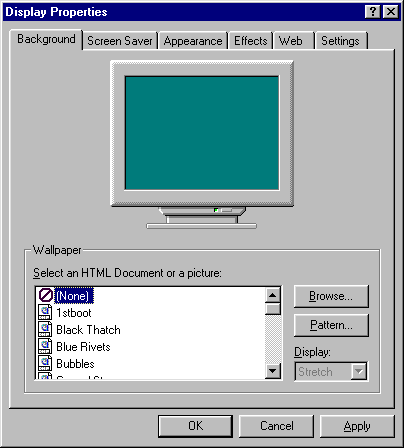
Dialog boxes pop up on your screen in response to some menu option. It gives you the current status and options for a particular feature.
In the dialog box above, you will see three
buttons at the bottom:
 OK: Click to close the dialog box
and to change the settings you have made.
OK: Click to close the dialog box
and to change the settings you have made.
Cancel: Click to close the dialog box without making changes.
Apply: Click to change the settings without closing the dialog
box. If you do not like the changed settings, you can click Cancel.
 Open
a dialog box and make changes to some settings. Click Apply to see if you like
the changes. If you do, click OK. If you do not, click Cancel.
Open
a dialog box and make changes to some settings. Click Apply to see if you like
the changes. If you do, click OK. If you do not, click Cancel.
Introduction to Computers
Developed by Alyce Bunting, Jintavee Monsakul, and Donna Green
 Return to Introduction to Computers
dfgreen.com
 Back
Back 